For iPad
Welcome to Body Wrap.
A drawing application designed by a tattoo artist, for tattoo artists.
My name is Terry Ribera. I've been tattooing for 25 years, and most of that has been focused on large scale work. What first drew me to it was seeing big, well composed tattoos — I found it fascinating, and it changed the way I thought about the job. I wanted to understand why those tattoos were composed the way they were, and it has become my life's mission to better understand how a tattoo ages, how it sits on the body, and how it visually reduces.
This isn't a new idea. Japanese tattoo artists have been approaching tattoos this way for 300 years. Polynesians for close to 3,000. The modern body suit revival has only been in practice for about 50.
I wanted to make a drawing application with that in mind — modern tools, built into a workspace for serious tattoo artists to improve their design process. I believe I've done that with this application.
Where it started
Tattoo templates that fit the client.
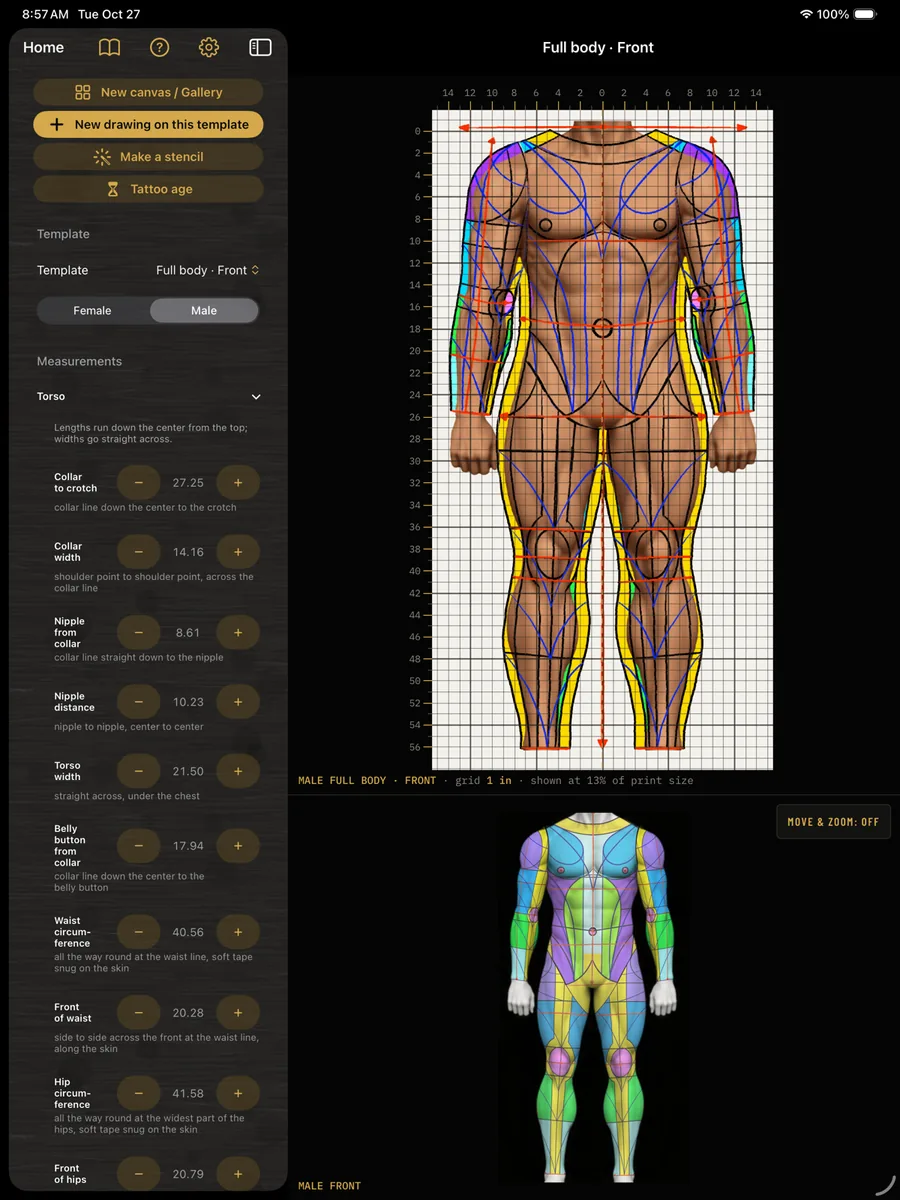
I started with a simple idea: take the tattoo templates I've used my entire career and make them available to other artists. It's a system for designing arm sleeves, leg sleeves, full backs, front torsos and the entire body, male or female, and it makes that work a lot easier to approach.
Every template is fully customizable to your client's measurements. I've tried to account for all the places I want to pin down when I take a tracing off a client's body — but without the tracing.
Now it's as simple as a tailor's tape, picking the body part, putting the numbers into the application and choosing the client's skin tone, and you have a template custom fit to that person.
There are 27 templates to choose from, full body projections, and skin tones so you can see how a tattoo might sit. I've also included some basic lessons, flow lines, and my thoughts on how to compose a body.
What's in it
Sleeve, leg and body suit templates
27 templates, each in a male and a female version. Type in the client's measurements and the template becomes that body. Draw the design flat, then print it at true size.
We do not stretch designs. The drawing is basically rolled and pressed over the skin, not stretched.Terry Ribera
Each sheet is the limb unrolled: its width at any height is the circumference at that height. An inch of paper is an inch of skin, so the drawing rolls back on and the edges meet at the seam.
Arm sleeves
Full arm, half sleeve and forearm, each in two versions. A splits on the inside of the arm, B splits on the back.
Leg sleeves
Full leg, inner leg, outer leg, upper thigh and calf. Nine leg templates in all, with a choice of where the seam falls.
Torso and full body
Front, back and side torso, torso and leg together, full body front, back and side, and full side front and back.
Measurements
Anatomical measurements, taken round the limb and from landmark to landmark, not tailoring measurements. The elbow and knee land on a fixed line, so they sit where they really are on the person.
On the body
See the design wrapped on a figure from several angles. Switch between a natural and a wider build, change the skin tone, and see roughly how the lines will soften as the tattoo ages.
Print and stencil
Print at true size, tiled across several sheets when the piece is bigger than the paper. Make a stencil from the line work. Export PNG, JPEG, HEIC, TIFF or a true-size PDF.
See it in use
Designing a body suit in Body Wrap
A three-minute screen recording: a full-body template set up from a client's measurements, the composition drawn in layers over it, color laid in, and the finished front and back designs.
The method behind it, from flow maps and rhythm lines to open skin, is written up step by step on the tattoo composition page.
The tools
A drawing app made for tattooing.
I designed this app with all the common tools any digital drawing application should have. Layers, opacity, scaling, duplicating, cut and paste, erase, undo — everything we're used to, that anyone who has ever drawn on a computer or a tablet already knows.
That said, I designed it with tattooing in mind. A place to build your own custom brushes and import your favorites. Geometric guides you can adjust. Mirroring tools. Body projections, so it's easy to toggle back and forth between the design area and see how it should fit on a person.
I also gave this application a powerful, professional grade drawing and painting experience, giving the artist total control and the freedom to stay inside it. Print from the app, share from the app, save from the app, organize from the app, and not need to use other drawing applications.
I made the workspace feel familiar, and I made the brushes feel familiar to traditional tools. I added skin tones and a tattoo aging feature to help artists better communicate how a tattoo might age over time, and what colors do on different skin types. You'll also find a good collection of papers, canvases and other drawing surfaces for making digital art and flash.
I intend to build on this app and make it better over time. I wanted to make something that fills the gaps other drawing applications miss. I'm a tattoo artist and a very passionate one. I made this application for me, and to give other artists the same tools, design theory and ability to draw large tattoos with much less of a struggle fighting applications that were not made for what we do.
Your work
It stays on your iPad.
Body Wrap has no accounts and no sign-in, and it doesn't collect anything. It doesn't connect to the internet at all — it works with the iPad in airplane mode. Your drawings, your clients' names and their measurements are on your iPad and nowhere else. Nothing goes anywhere unless you send it yourself.
Questions
Body Wrap questions
What does Body Wrap run on?
iPad, with iPadOS 16 or later. It works with Apple Pencil pressure and tilt, and on the newest Apple Pencil it also responds to squeeze and barrel roll. It opens on iPhone too, but it is built for iPad.
Is it available now?
Not yet. Body Wrap is in testing and is coming to the App Store.
Does it need the internet or an account?
No. There is no account and no sign-in, and the app has no internet connection at all. It works with the iPad in airplane mode, and your drawings and your clients' measurements stay on the iPad.
Can I print a template at true size?
Yes. Templates print at the size they will be on skin, tiled across several sheets when the piece is bigger than the paper. PDF exports are true size too.
Can I share a project with another artist?
Yes. A whole project saves as a single .bodywrap file that another artist with the app can open.
Does it project any design onto any body in 3D?
No. Body Wrap is a template system with a preview, not a 3D scanner. The sheet is the limb unrolled, so a drawing made on it rolls back onto the body, and the on-the-body view shows how it sits.
Body Wrap
For iPad. Coming to the App Store.
For iPad, iPadOS 16 or later. Works with Apple Pencil. · Privacy policy